<style>
.mlat-guide {
--u: clamp(16px, 15.2px + 0.2vw, 16.8px);
--g-accent: #0A74C4;
--g-accent-dark: #0A5FA0;
--g-bg: #ffffff;
--g-bg-alt: #F5F7FA;
--g-text: #14181D;
--g-soft: #5B6772;
--g-border: #D6DEE6;
font-family: -apple-system, BlinkMacSystemFont, 'SF Pro Text', system-ui, 'Segoe UI', Roboto, 'Helvetica Neue', sans-serif;
font-size: calc(0.95 * var(--u));
line-height: 1.65;
color: var(--g-text);
max-width: 880px;
margin: 0 auto;
padding: 0 0 2em;
text-align: left;
}
.mlat-guide h1, .mlat-guide h2, .mlat-guide h3 {
font-family: -apple-system, BlinkMacSystemFont, 'SF Pro Display', system-ui, 'Segoe UI', Roboto, 'Helvetica Neue', sans-serif;
letter-spacing: -0.01em;
border: 0;
}
.mlat-guide h1 { font-size: clamp(calc(1.7 * var(--u)), calc(1.3 * var(--u)) + 1.5vw, calc(2.2 * var(--u))); line-height: 1.1; margin: 0.3em 0 0.3em; color: var(--g-accent-dark); }
.mlat-guide h2 { font-size: calc(1.4 * var(--u)); color: var(--g-accent); margin: 1.9em 0 0.4em; padding-top: 0.6em; border-top: 1px solid var(--g-border); }
.mlat-guide h3 { font-size: calc(1.08 * var(--u)); color: var(--g-accent-dark); margin: 1.3em 0 0.3em; }
.mlat-guide p, .mlat-guide li { color: var(--g-soft); }
.mlat-guide p { margin: 0 0 0.9em; }
.mlat-guide ul, .mlat-guide ol { margin: 0 0 1em; padding-left: 1.3em; }
.mlat-guide li { margin: 0.2em 0; }
.mlat-guide strong, .mlat-guide b { color: var(--g-text); font-weight: 600; }
.mlat-guide a { color: var(--g-accent); font-weight: 600; text-underline-offset: 3px; }
.mlat-guide a:hover { color: var(--g-accent-dark); }
.mlat-guide kbd {
display: inline-block; min-width: 1.5em; padding: 0.05em 0.45em;
border: 1px solid var(--g-border); border-bottom-width: 2px; border-radius: 5px;
background: var(--g-bg-alt); color: var(--g-text);
font: 600 0.85em/1.4 ui-monospace, SFMono-Regular, Menlo, monospace; text-align: center;
}
.mlat-guide code { font-size: 0.88em; background: var(--g-bg-alt); border: 1px solid var(--g-border); border-radius: 4px; padding: 0.05em 0.35em; color: var(--g-text); }
.mlat-guide .g-crumb { font-size: calc(0.85 * var(--u)); color: var(--g-soft); margin: 1.2em 0 0; }
.mlat-guide .g-crumb a { font-weight: 500; }
.mlat-guide .g-lede { font-size: calc(1.08 * var(--u)); color: var(--g-text); }
.mlat-guide .g-toc { display: flex; flex-wrap: wrap; gap: 0.5em; margin: 1em 0 0.5em; padding: 0; list-style: none; }
.mlat-guide .g-toc a {
display: inline-block; padding: 0.25em 0.9em; border: 1px solid var(--g-border); border-radius: 999px;
font-weight: 500; font-size: calc(0.86 * var(--u)); text-decoration: none; color: var(--g-accent-dark); background: var(--g-bg);
}
.mlat-guide .g-toc a:hover { background: var(--g-bg-alt); }
.mlat-guide figure { margin: 1.2em 0 1.4em; }
.mlat-guide figure img {
display: block; max-width: 100%; height: auto; margin: 0 auto;
border: 1px solid var(--g-border); border-radius: 14px; box-shadow: 0 6px 22px rgba(20, 24, 29, 0.10);
}
.mlat-guide figure.g-narrow img { max-width: min(100%, 380px); }
.mlat-guide figure.g-mid img { max-width: min(100%, 600px); }
.mlat-guide figcaption { font-size: calc(0.86 * var(--u)); color: var(--g-soft); text-align: center; margin-top: 0.6em; font-style: italic; }
.mlat-guide .g-tip, .mlat-guide .g-note {
border-radius: 14px; padding: 0.9em 1.1em; margin: 1em 0 1.2em; border: 1px solid var(--g-border); background: var(--g-bg-alt);
}
.mlat-guide .g-tip { border-left: 4px solid var(--g-accent); }
.mlat-guide .g-tip > :last-child, .mlat-guide .g-note > :last-child { margin-bottom: 0; }
.mlat-guide .g-tip b:first-child, .mlat-guide .g-note b:first-child { color: var(--g-accent-dark); }
.mlat-guide table { width: 100%; border-collapse: collapse; margin: 0.6em 0 1.4em; font-size: calc(0.92 * var(--u)); }
.mlat-guide th, .mlat-guide td { text-align: left; vertical-align: top; padding: 0.55em 0.7em; border-bottom: 1px solid var(--g-border); color: var(--g-soft); }
.mlat-guide th { color: var(--g-text); font-weight: 600; background: var(--g-bg-alt); }
.mlat-guide td:first-child { color: var(--g-text); font-weight: 500; white-space: nowrap; }
.mlat-guide .g-legend { counter-reset: g; list-style: none; padding: 0; display: grid; grid-template-columns: repeat(auto-fit, minmax(240px, 1fr)); gap: 0.4em 1.6em; }
.mlat-guide .g-legend li { counter-increment: g; position: relative; padding-left: 2.2em; margin: 0.25em 0; }
.mlat-guide .g-legend li::before {
content: counter(g); position: absolute; left: 0; top: 0.1em; width: 1.6em; height: 1.6em; border-radius: 50%;
background: #0A5FA0; color: #fff; font-weight: 700; font-size: 0.85em; line-height: 1.6em; text-align: center;
}
.mlat-guide .g-tiles { display: grid; grid-template-columns: repeat(auto-fill, minmax(240px, 1fr)); gap: 1em; margin: 1em 0 1.5em; }
.mlat-guide a.g-tile {
display: block; padding: 1em 1.1em; border: 1px solid var(--g-border); border-radius: 14px; background: var(--g-bg);
text-decoration: none; color: var(--g-text); transition: border-color 0.15s, box-shadow 0.15s, transform 0.15s;
}
.mlat-guide a.g-tile:hover { border-color: var(--g-accent); box-shadow: 0 6px 18px rgba(10, 95, 160, 0.12); transform: translateY(-1px); }
.mlat-guide a.g-tile b { display: block; font-family: -apple-system, BlinkMacSystemFont, 'SF Pro Display', system-ui, 'Segoe UI', Roboto, 'Helvetica Neue', sans-serif; font-size: calc(1.1 * var(--u)); color: var(--g-accent-dark); margin-bottom: 0.2em; }
.mlat-guide a.g-tile span { display: block; color: var(--g-soft); font-weight: 400; font-size: calc(0.9 * var(--u)); line-height: 1.45; }
.mlat-guide .g-pager { display: grid; grid-template-columns: 1fr 1fr; gap: 1em; margin: 2.5em 0 0; padding-top: 1.2em; border-top: 1px solid var(--g-border); }
.mlat-guide .g-pager a { display: block; padding: 0.8em 1em; border: 1px solid var(--g-border); border-radius: 14px; text-decoration: none; }
.mlat-guide .g-pager a:hover { background: var(--g-bg-alt); }
.mlat-guide .g-pager small { display: block; color: var(--g-soft); font-weight: 500; font-size: calc(0.8 * var(--u)); }
.mlat-guide .g-pager .g-next { text-align: right; grid-column: 2; }
.mlat-guide .g-btn { display: inline-block; padding: 0.6em 1.3em; border-radius: 999px; background: var(--g-accent-dark); color: #fff !important; text-decoration: none; font-weight: 600; }
.mlat-guide .g-btn:hover { background: var(--g-accent); }
@media (max-width: 600px) {
.mlat-guide .g-pager { grid-template-columns: 1fr; }
.mlat-guide .g-pager .g-next { grid-column: 1; }
.mlat-guide td:first-child { white-space: normal; }
}
</style>
User Guide › Settings
Settings
Settings are in the menu under Settings. Every change takes effect straight away and is remembered on this device.
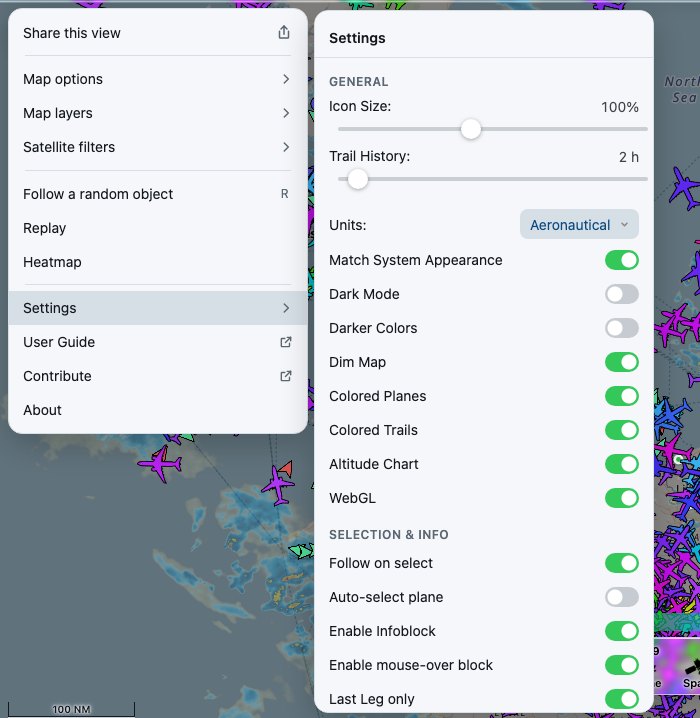 Settings open beside the menu on a computer
Appearance
| Setting | What it does |
|---|
| Text and Icon size | Scales the map's text and icons together. |
| Icon size multiplier | Makes the object icons larger or smaller, leaving text alone. |
| Vessel Track History | How many hours of track to draw behind a selected vessel. |
| Units | Aeronautical (feet, knots, nautical miles), Metric or Imperial. |
| Match System Appearance | Follows your device's light or dark mode. |
| Dark Mode | Dark colours, when not matching the system. |
| Darker Colors | Uses deeper colours for icons and tracks, which can be easier to see on light maps. |
| Dim Map | Dims the base map so objects stand out. |
| Colored Planes | Colours aircraft by altitude. Off draws them all in one colour. |
| Colored Trails | Colours tracks by altitude. |
| Altitude Chart | Shows the altitude colour key above the bottom bar. |
| WebGL | Draws icons using the graphics chip: much faster with thousands of objects. Turn off only if icons look wrong on your device. |
Selection & info
| Setting | What it does |
|---|
| Follow on select | Starts following an object as soon as you select it. |
| Auto-select plane | Selects an aircraft for you automatically when nothing is selected. |
| Enable Infoblock | Opens the details panel when you select something. |
| Wide Infoblock | A wider details panel on a computer. |
| Enable mouse-over block | On a computer, shows a small summary when you point at an object. |
| Last Leg only | For an aircraft's history, shows only its latest flight rather than the whole day. |
| Lookup route | Looks up each flight's route (origin and destination) from its callsign. |
Labels & altitude
| Setting | What it does |
|---|
| Label units | Adds units (ft, kt) to the numbers in labels. |
| Smaller wind labels | A compact style for wind information in labels. |
| Live track labels: UTC | Track label times in UTC rather than your local time. |
| Historic track labels: UTC | The same, for history and replay tracks. |
| Labels: geom. alt. (WGS84) | Labels show GPS (geometric) altitude instead of pressure altitude. |
| Geom. alt.: WGS84 -> EGM conversion | Converts GPS altitude to height above mean sea level. Downloads a large model the first time. |
| Baro. alt.: correct for QNH | Adjusts pressure altitude for local air pressure where it is known. |
Location & sharing
| Setting | What it does |
|---|
| Update GPS location | Keeps your position up to date as you move, instead of fixing it once. |
| Distance Circles | Distance circles around the site, where the site provides them. |
| Include Filters In URLs | Adds your object-list filters to shared links. |
Reset
Reset All Settings, at the bottom of the panel, puts every setting, option and layer back to its default on this device.